DECEMBER 2009
Something for Everyone in Sage MAS 90 and 200 version 4.4 (Part 2)
The excitement is continuing to build around the upcoming 4.4 release. From Core Financials and Project Management to Distribution and Manufacturing, our Beta testing sites are giving rave reviews about the workflow and business process new features in Sage MAS 90 and 200 4.4. Read on to learn more about what you can look forward to:
Enhanced Customizer - Everyone
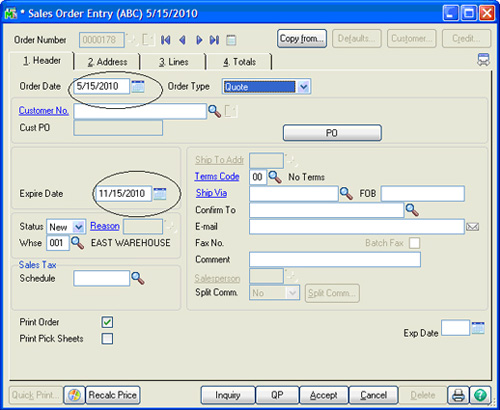
In 4.4, you'll be able to simplify the process of applying customizations to your system, and your customizations will be able to survive upgrades, so they won't have to be recreated for a future new release. We've continued to build on the tools we provide in Custom Office and will include Enhanced Customizer in 4.4. Custom Office provides the ability for administrators and users to add new functionality, often without the need to press an extra button. Two examples of the types of enhancements that you will be able to add are — the ability to include expiration dates or other attributes to lot and serial items, with the dates flowing through the system; and, using simple Customizer scripting, a Sales Order Quote will add 180 days to today's date and use the calculated date as the Quote Expiration date. In many cases, your Business Partner will be able to create the modifications at their office, export them, and e-mail them to you. You'll then be able to import and apply your new features using the built-in import tools in 4.4. This will help reduce your costs and streamline adoption of your new customization!
New Desktop - Everyone
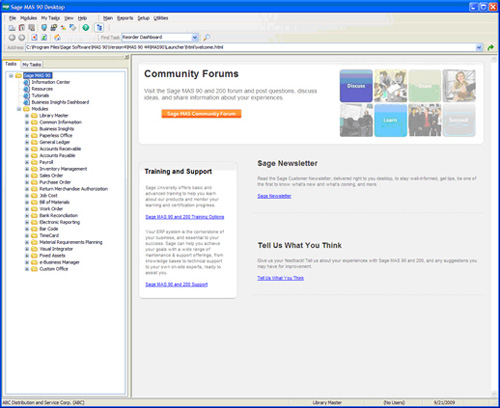
We've updated and enhanced the desktop area in 4.4 to provide you with an easy access point to resources. From one screen you'll be able to click directly to the Sage MAS 90 and 200 Online Community, access current and back issues of this customer newsletter, contact Customer Support, view the most recent Training schedule and sign up for classes. The Resources section will also be updated, and will continue to provide access to the "What's New" information in the 4.4 release, and efficient access to the release enhancement highlights. Resources will also provide easy access to the Getting Started Guide and Upgrade Guide PDFs, and other manuals, so each user can have their own electronic copy for easy reference. The Resources section also provides ready access to the Help Center, Business Insights Dashboard, Help topics, and more.
From the new desktop, you'll also be able to access an online suggestion box to make an enhancement request, as well as view and vote on enhancement requests that other customers have made. Using this link, track the status of your submission as it moves through the Sage evaluation process, and when and if it's incorporated into a new future version of the product.
Inventory Counts - Distribution and Manufacturing
If you are a Distributor or Manufacturer, you will be able to use the new physical count features to assist in streamlining your workflow. In 4.4 we've added the ability for you increase accuracy by printing the Quantity On Hand on the physical count worksheet, so as your warehouse manager supervises the process, they will be aware of the expected count. To facilitate fast entry, the items to be counted will be displayed on the physical count entry screen in the same sort order as what's printed on the physical count worksheet and can choose to also have the expected quantity pre-populated to make data entry easier than ever. With these enhancements and more, you'll be able to increase accuracy and reduce the time associated with your physical count process.
Last months' article covered expanded Customer and Item Numbers, Parallel Migration, and Bill of Materials enhancements.
For more details on any of the new Sage MAS 90 and 200 4.4 features that are summarized in this article, please contact your Sage Business Partner, your Customer Account Manager, sign up for the What’s New in 4.4 Anytime Learning course here. In next month's newsletter, you'll read about many more new features in Sage MAS 90 and 200 4.4…
Next: Sage Authorized Training Campuses
 |
|











 Share this article