
search icon

Powerful invoicing software for faster payments and streamlined processes

Every invoice paid means more revenue in your business. See how online invoicing software creates and tracks invoices in real-time, automates reminders and recurring invoices, and helps process invoices faster.

Explore the key features of our invoicing software

Over 3 million global businesses of all types, from sole traders to small and medium companies, trust our flexible, dynamic, and easy-to-use invoicing software.

Create and customise invoices

Choose a template, customise with your logos and details. It's fast and easy to make sure your invoices look polished every time.

Send and receive without delay

Automatically send invoices via email, PDF, or other electronic formats, and accept payments the way your customers prefer.

Flexible payment options

Enable payments via credit card, ACH, or PayPal to give your customers more ways to pay.

Convert quotes to invoices

Convert quotes into invoices instantly and send them to your customers with a click.

Track invoiced hours

Easily monitor time spent on client work and ensure accurate billing. Log your hours on the go and update the total in real time.

Record billable expenses

Keep detailed records of expenses and quickly turn them into billable invoices.

Automate payment reminders

Stay on top of cash flow and get paid on time, every time, with easy-to-set-up automated reminders.

Get actionable reports

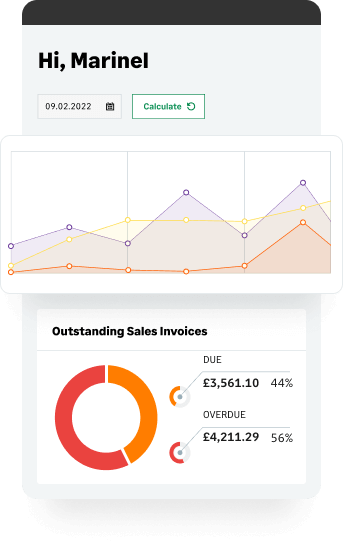
Access rich, real-time financial performance insights to make informed decisions with intuitive, customisable dashboards.

Integrates seamlessly

Seamlessly integrate your workflows by easily connecting to your bank, accounting systems, and financial planning solutions.

Key benefits of the best invoicing software

Whether you’re a sole trader, a small business, or a medium-sized company on the rise, our invoicing software adapts to your needs. Upgrade or cancel anytime—no long-term contracts or commitments.

Explore our business invoicing software

Discover our flexible and intuitive invoicing software for small business and medium-sized companies with growth ambitions. There are no long-term contracts, so you can easily upgrade or cancel your billing software as your business needs evolve.

Sage Accounting<br> <span class="text-highlight-ai" style="line-height:1.6;">with Ai</span>

Simple accounting software for small business, with built in payroll. Save up to 5 hours weekly on admin with the added power of AI.

Flexible online accounting software. Unlock potential, gain clarity, and save time with cloud accounting software for freelancers, sole traders, and small businesses.

  • Get paid 7 days faster and save up to 5 hours of admin per week
  • Create and send sales invoices
  • Track what you're owed
  • Automatic bank reconciliation
  • Calculate and submit VAT
  • Easy to set up and use
  • Be Making Tax Digital ready for VAT
  • Payroll and essential HR features built in

Sage 50 Accounts<br> <span class="text-highlight-ai" style="line-height:1.6;">with Ai</span>

Desktop accounting software with cloud connectivity, giving you a complete view of your business finances and inventory.

Desktop accounting with cloud connectivity for small businesses with advanced needs:

  • Manage cash flow to stay in control and grow your business
  • Accept payments easily and get paid faster
  • Full visibility and control of your payments from anywhere
  • Automate admin with a cash flow AI tool that saves hours of work
  • Make complex accounting simple with advanced stock management
  • Get Sage Copilot, your AI-powered productivity assistant

Sage Intacct<br> <span class="text-highlight-ai" style="line-height:1.6;">with Ai</span>

The leader in cloud accounting and financial management software. Perfect for scale-ups to global enterprises. Bespoke pricing, tailored to your business.
  • Track multiple accounts in real-time
  • Consolidate multiple entities and more in minutes
  • Collaborate from a single source of truth
  • Make strategic decisions with dimensional reporting and analytics
  • Open APIs allow multiple, stable, secure integrations
  • Get Sage Copilot, your AI-powered productivity assistant
  • Digital audit trails for confidence and compliance
  • Access your financials anywhere, anytime
  • Customisable revenue recognition
  • Fully automate allocations for speed and accuracy
  • Global consolidations and tax legislation compliance
  • Project costing, time and expenses, and billing in one workflow

Andy McKeon

Group Financial Controller, Colmore PS

What previously took five minutes per invoice is probably now a minute per invoice, which, when you’ve rolled out over 100 invoices a month, is quite a saving.

Invoicing software FAQs

Invoicing software is an online or desktop tool that helps businesses create, send, and manage invoices more efficiently. With features like customisable templates and automated reminders, it streamlines your billing process and simplifies payment collection.

E-invoicing, or electronic invoicing, is the process of creating, sending, and receiving invoices in a digital format. Unlike traditional paper or PDF invoices, e-invoices are structured for seamless integration between systems, allowing businesses to automate billing and payment processes.

Traditional invoicing typically relies on a slow, manual process, which includes filling in billing details, printing paper copies, and physically sending them to customers. With e-invoicing, businesses can reduce admin tasks, improve accuracy, and track payments more efficiently. Customers receive invoices electronically, making it easier for them to pay on time. Our e-invoicing software integrates with partner tools within the Sage Network and trusted payment providers, simplifying the entire process.

Sole traders often rely on Excel due to availability and budget constraints. Excel might be useful if you only occasionally need to generate and send invoices, but it isn't designed to be invoicing software. As your business grows, maintaining invoices in Excel formats can be daunting. Modern small businesses, medium companies, and sole traders typically switch over to invoice automation software to streamline invoicing processes and manage payments easily.

If you have been using Excel templates or spreadsheets to create and keep track of your invoices, you can easily import your data to Sage. With a variety of customisable, professional yet simple templates, you'll never have to rely on Excel again.

Manually creating invoices with tools like Word or Excel can be time-consuming and makes it hard to manage your cash flow. Business invoicing software streamlines the process, saving you time and helping you stay on top of your billing. By implementing a solution with e-invoicing features, you can:

  • Automate your invoicing: streamline tasks like creating, sending, and tracking invoices.
  • Track payments effortlessly: monitor outstanding and upcoming invoices in one centralised system.
  • Manage late payments easily: set up automated reminders to encourage customers to pay on time.
  • Save time and reduce errors: digitise your invoicing process for better efficiency and accuracy.
  • Present a professional image: create polished, branded invoices that reflect your business.

Online invoicing systems help you focus on what matters most—running your business—while keeping your payments organised and efficient.

Absolutely. For complete financial clarity, an effective invoicing solution should be part of an accounting platform that manages both sides of your cash flow:

  • Accounts Receivable (AR): The money owed to you (the invoices you send)
  • Accounts Payable (AP): The money you owe your suppliers (the bills you receive)

Managing both AR and AP within a single invoice management automation platform gives you a real-time, accurate picture of your business’s financial health, enabling better cash flow forecasting.

For advanced AP management, the system also helps with:

  • Purchase Order (PO) matching: This ensures accuracy and helps prevent fraud by automating cross-referencing of supplier bills with your original Purchase Orders and goods received notes. This might involve two-way or three-way matching to make sure that you only pay for what you ordered and received.
  • Automated approvals: The cloud invoicing system can automatically route supplier bills through custom approval workflows, ensuring compliance and control before any outgoing payment is made.

To be legally valid, an invoice must include an offer made by one party and accepted by another. While requirements vary by region, invoices typically need:

  • Invoice number: a unique identifier for tracking.
  • Seller and buyer information: names, addresses, and contact details for both parties.
  • Description of goods/services: quantities, unit prices, taxes, and discounts.
  • Total amount due: the full amount owed, including taxes or discounts.
  • Payment terms: due date, accepted payment methods, and any late payment penalties.

For more details on what to include, have a look at our invoice cheat sheet. Using tools like invoice software makes it easier to include all the necessary elements, ensuring compliance and professionalism.

The invoice itself typically represents the final step in a sales agreement, and any contractual obligation is generally established before the invoice is sent—either through a quote, a service agreement, or a contract that the customer accepts.

However, using professional invoicing software significantly strengthens the transaction by providing:

  • Auditability: The invoice system records a digital trail of the sales process from quote to payment.
  • Proof of delivery/acceptance: The software provides a clean, time-stamped, and compliant document detailing the offer and acceptance of goods or services.
  • Invoice tracking: Features within the software allow you to track the invoice status in real time, showing when it was sent, viewed, and paid. This digital tracking provides irrefutable evidence that the customer received the financial demand, reinforcing its legal standing.

Absolutely. You can easily import existing invoices and historical data when switching to Sage from other systems like Xero or Quickbooks. Import effortlessly with simple CSV templates or with 1-1 support whenever you need it.

While Sage solutions do not support specific options like 'Buy Now, Pay Later' (BNPL), by integrating with trusted third-party payment providers, customers can pay using credit cards, and PayPal.

For businesses dealing with project-based or long-term work, the Sage Intacct cloud accounting offering also includes “Project Accounting/Project Billing” modules that support billing by milestones, schedules, or percentage completion.

Choosing the best invoice software means finding a solution that fits your business needs and budget while offering simplicity, scalability, and seamless integration.

Look for an online invoice system that prioritises security, compliance, and quality customer support. Read user reviews and industry recommendations to identify trusted providers. Go beyond just traditional invoicing features. Make sure the invoicing software include comprehensive financial dashboards with key metrics and offer built-in financial reporting and analytics, so you can stay on top of how your business performs.

Invoicing tips for small businesses

Sage Advice

Read our blog for expert advice on invoicing, practical tips, and valuable insights to help your business thrive. Uncover smarter ways to manage your invoices and unlock new opportunities for success.

Accounts payable automation: How it works, key benefits, and why your business needs it

Accounts payable automation: How it works, key benefits, and why your business needs it

Discover how AI-powered accounts payable automation streamlines invoice processing, reduces errors, and saves time. Learn the benefits for UK businesses today.

Read more
Read more
What are the most important accounts receivable KPIs to track?

What are the most important accounts receivable KPIs to track?

Improve cash flow with accounts receivable metrics. Learn which accounts receivable KPIs matter most and how to track them effectively for your business.

Read more
Read more
Understanding nonprofit financial ratios

Understanding nonprofit financial ratios

Discover how nonprofit financial ratios serve as KPIs to assess your organisation's financial health, with examples and best practices for UK charities.

Read more
Read more
Restaurant accounting: The essential guide

Restaurant accounting: The essential guide

Restaurant owner or manager? Learn how restaurant accounting and the right tools can simplify finances and help take your restaurant business to the next level.

Read more
Read more
Fundraising ideas for charities: A guide to different fundraising methods

Fundraising ideas for charities: A guide to different fundraising methods

Discover effective fundraising ideas for charities. From events to crowdfunding, explore proven charity fundraising methods to boost donations and engagement.

Read more
Read more
Subledger vs general ledger: Key differences made clear and why they matter

Subledger vs general ledger: Key differences made clear and why they matter

Understand subledger vs general ledger and how these accounting tools work together to keep your financial records accurate, compliant, and audit-ready.

Read more
Read more
Strategic budgeting explained: the finance team's role in long-term planning

Strategic budgeting explained: the finance team's role in long-term planning

Discover strategic budgeting and where your finance team's expertise fits in the wider plan for business growth, resilience and smarter decisions ahead.

Read more
Read more
Sales order vs purchase order: What are the differences?

Sales order vs purchase order: What are the differences?

Sales order vs purchase order: learn when to use each document, what they include, and how they work together in business transactions and operations.

Read more
Read more

Have any questions?

Want to learn more about our business invoicing software? We'd be happy to answer any questions you have and help you decide which solution best suits your needs.